



Outsourced IT Services for Small Business: Explore Types, Costs & Best Practices.
Regulating a small-sized business means handling numerous responsibilities. You’re managing employees, handling customers, watching finances, and somehow trying to keep all your technology working efficiently. Your computer smacked during an important client presentation, the internet goes down right before an important deadline, or your team can’t access critical files because of a server issue. These aren’t just minor problems; they directly impact your time and revenue.
Most small business owners aren’t IT experts, and that’s perfectly fine. You started your business because you’re passionate about your product or service, not because you wanted to become a tech specialist. But here’s the reality: technology problems don’t wait for suitable times. When your systems fail, every minute of downtime costs money. This is exactly where outsourced IT services for small businesses become not just helpful, but necessary for survival and growth.
The answer gets even more difficult when you consider hiring a full-time IT staff. For most small businesses, maintaining an in-house IT department simply isn’t financially feasible. Yet the technology needs are real and growing. This gap between fundamentals and budget is what makes IT outsourcing such a practical solution for businesses of all sizes.
What Are Outsourced IT Services?
Outsourced IT services mean hiring outside experts to handle your technology needs instead of managing everything in-house. Think of it like having a virtual IT department that works for you without being on your payroll. These teams monitor your systems, fix problems, implement new technology, and keep everything running evenly so you can focus on your other tasks.
What makes this approach particularly valuable for small businesses?
It’s all about the smart strategies you offer, so adjust your IT support based on real needs, not guesswork.
You’re not locked into costly, prolonged commitments for resources you might not always need. When your business is slow, you use less support. When you’re growing swiftly and facing more technical challenges, you scale up the services. This method makes managed IT services more easier for small business operations.
Modern outsourced IT providers use advanced remote tools to access your systems and solving the problems quickly. They don’t always need to be physically present in your office. Most of the issues get resolved within minutes through remote connections, saving both time and money. And now remote support handles the majority instead of physical presence.

Why Small Businesses Need Outsourced IT Services
Small businesses face unique technology challenges that larger companies with dedicated IT departments don’t experience. When you have limited staff, losing even one person to technical troubles creates a ripple effect across your entire operation. Customer service suffers, deadlines get missed, and opportunities slip away while everyone waits for systems to work again.
Consider what happens during a typical technical crisis in a small business. Your CRM system stops working during your busiest hours. Without IT support, you’re stuck, unable to support the customers, customers getting frustrated, and revenue literally walking out the door. With outsourced IT support services, one quick call connects you to professionals who diagnose and fix the problem while you continue serving customers.
Top 6 Types of Outsourced IT Services for Small Businesses
1: Help Desk Software / Solution
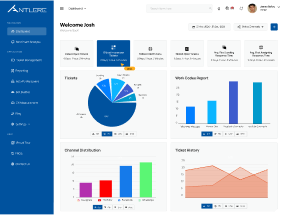
Help Desk Software solutions provide the foundation for organized technical support in modern businesses. These systems let employees submit problems through simple online portals, creating tickets that get tracked from start to finish. Every issue receives proper attention, nothing falls through the cracks, and you can see exactly how quickly problems get resolved. The software organizes requests by priority, routes them to the right technicians, and maintains complete records of what was done to fix each problem. This step by step approach transforms unorganized support into smooth, predictable service delivery that keeps your business productive.
2: Contact Center Services
Contact Center Services is not just answering phones when customers call with questions. Professional contact centers handle inbound customer queries, technical support requests, order processing, and resolving complaints with instructed specialists who build your brand globally. They also manage outbound activities like customer follow-ups, satisfaction surveys, appointment scheduling, and communication about service updates. These services incorporate multiple communication channels like phone, email, chat, and social media, into united platforms, ensuring customers receive in-line, high-quality experiences.
3: Knowledge Base System
Knowledge Base Systems create a main database where your team can find answers to common questions quickly without waiting for help. These databases contain step-by-step guides, troubleshooting instructions, and solutions to frequently asked questions.
4: Quality Management System
Quality Management Systems secure your business processes to meet standards through monitoring, measurement, and improvement tools. These platforms encounter performance metrics, identify trends and patterns in service delivery, conduct quality support, and provide functional insights for continuous improvement. They help you maintain compliance with industry trends, document your procedures properly, and ensure every customer receives the same high level of service. Quality management transforms subjective assessments into objective data-guided solutions.
6: Customer Experience Management
Customer Experience Management provides infrastructure for understanding how customers actually know about your business through formal feedback collection and analysis. These services design and deploy mystery shopping surveys across different platforms in the customer journey, analyze response patterns to identify improvement opportunities, track satisfaction trends over time, notice your performance against industry standards, and translate raw feedback into specific actionable steps. Rather than guessing what customers want, you gain solid data showing exactly where to focus and put your efforts for maximum ROI.
How Much Does IT Outsourcing Cost for Small Businesses?
Understanding outsourced IT services for small business cost helps you to analyse budget spending and choose the right service model according to your needs. Most of the BPO Companies offer flexible pricing structures that align with business requirements.
- The dedicated team model allocates individual IT professionals to work selectively with your business for a set monthly fee. You get continuous support from experts who become familiar with your systems, understand your needs, and can provide go-ahead recommendations.
- Fixed price arrangements define specific services and packages for a predetermined cost, giving you a complete budget. You know exactly what you’re getting and what you’ll pay each month. This approach suits businesses that prefer stability.
- Usage-based pricing charges are based on actual hours worked and resources consumed, with variable or unpredictable IT needs. You pay only for services actually used. While price can differ month to month, you have a clear picture of what you’re being charged for and for what reason.
Market Trends: Growth of IT Outsourcing for Small Businesses
According to Clutch’s survey of 517 small business leaders, 83% of small businesses planned to maintain or increase their spending on outsourced business services in 2023, with 64% having action plans ready to combat economic uncertainty.

How to Choose the Right IT Outsourcing Partner
Experience should be your top evaluation criterion when selecting business IT support providers. Ask potential questions about how long they’ve been operating, what industries they practiced in, and whether they have clients similar to your business size and type. Companies with manifest data records in your sector understand your main challenges and regulatory requirements better than those who claim to serve everyone.
Service offerings must match your actual demands, both now and as you grow. Review properly what each provider includes in their packages. Some focus primarily on break-fix support while others offer comprehensive managed services, including monitoring, security, backups, and strategic planning. Make sure their outsourced IT services align with your technology needs and business objectives.
Response time directly impacts how much downtime you’ll experience when problems occur. Ask about their offered response times for different support levels. Important issues that affect your business activities should receive a quick response. Get these commitments in writing as part of your service agreement.
Conclusion: Why Abacus Outsourcing is a Smart Choice for Your Business
Outsourced IT services for small business operations have changed from a probability to an absolute necessity. The benefits are clear and measurable: dramatic cost savings compared to in-house IT staff, access to skilled expertise that would be impossible to hire directly, improvements that match your changing needs, and the energy to focus your business rather than fighting technology fires.
If you’re ready to experience Top IT operations and see how professional support will shape your business efficiency, Abacus BPO offers outsourced IT support services especially designed to meet small business needs. Our help desk software, contact center services, and complete managed IT services are adding growth to your business.