On this page
- The Real Definition: More Than Just a Ticketing Tool
- How It Actually Works: The Ticket Lifecycle
- 5 Signs Your Business Needs Help Desk Software Right Now
- Core Features That Actually Matter (And What to Ignore)
- Help Desk Software vs. Shared Inbox: The Hidden Cost Comparison
- Who Should Be Using Help Desk Software?
- What to Look for When Choosing One
- The Bottom Line
Every business reaches a breaking point with customer support. Emails pile up in a shared inbox, WhatsApp messages go unanswered, and your team has no idea which tickets are urgent and which have already been resolved. That chaos has a name - and help desk software is the solution.
This guide breaks down exactly what help desk software is, what it does, and why businesses that delay adopting it pay a hidden cost most never calculate.
The Real Definition: More Than Just a Ticketing Tool
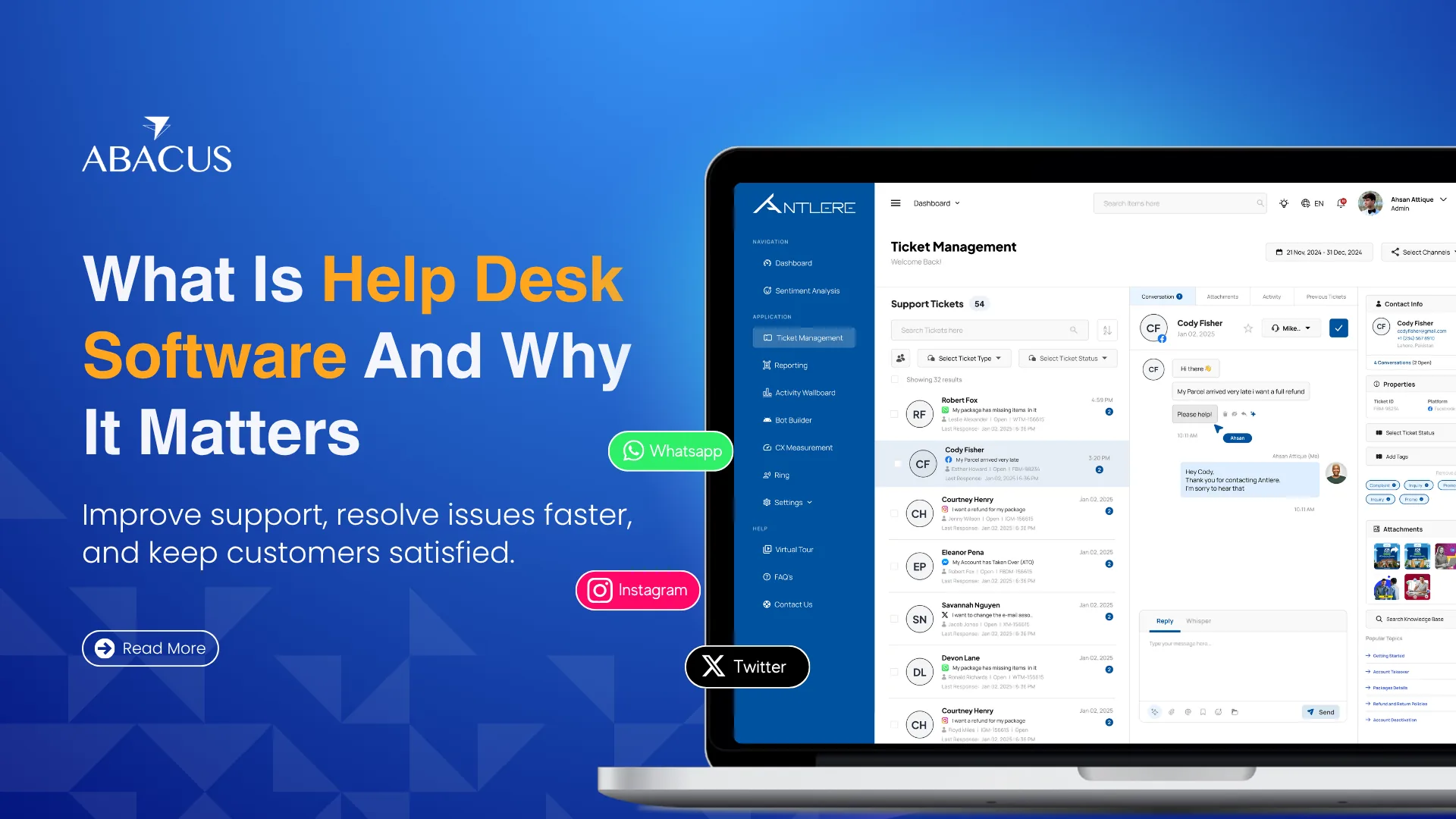
Help desk software is a centralized platform that captures, organizes, assigns, and tracks every customer support request regardless of which channel it came through. Email, live chat, WhatsApp, social media, web forms, all of it lands in one unified system as a structured ticket.
But the definition understates what modern help desk systems actually do. Today's platforms include sentiment analysis, AI-assisted response suggestions, SLA tracking, agent performance dashboards, and deep integrations with CRMs and communication tools. Calling it a "ticketing tool" is like calling a smartphone a calling device.
How It Actually Works: The Ticket Lifecycle
Most business owners understand the concept but not the mechanics. Here is what happens inside a help desk system from the moment a customer reaches out:
A customer sends a message through any channel. The system automatically converts it into a ticket and assigns it a priority level, category, and agent - based on rules you define. The assigned agent sees the full customer history, previous conversations, and any relevant notes before responding. If the ticket is not resolved within a set timeframe, it escalates automatically. Once resolved, the system logs the interaction, updates performance metrics, and can trigger a satisfaction survey.
No manual sorting. No missed messages. No, "I thought you were handling it."
5 Signs Your Business Needs Help Desk Software Right Now
You do not always know you need a system until the damage is already done. These are the warning signs most businesses ignore for too long:
1: You are losing track of tickets across channels. If your team juggles a Gmail inbox, WhatsApp Business, Instagram DMs, and a website form separately, queries are falling through the cracks daily.
2: Response times are inconsistent. Some customers hear back in an hour. Others wait two days. No system means no standard.
3: You have no data on support performance. You cannot improve what you cannot measure. Without a help desk, you have no visibility into resolution times, agent workload, or recurring issues.
4: Customers are repeating themselves. When there is no ticket history, every interaction starts from scratch, frustrating customers and wasting agent time.
5: Your team is growing, but support quality is not. Scaling headcount without a system just creates more chaos, not more efficiency.
Core Features That Actually Matter (And What to Ignore)
Vendors often list 40+ features on their product pages. Most of them are noise. These are the ones that directly impact your support quality:
|
Feature |
What It Does |
Why It Matters |
|
Omnichannel Ticketing |
Unifies email, chat, social, and WhatsApp into one inbox |
Eliminates missed queries across channels |
|
Automated Ticket Routing |
Assigns tickets to the right agent automatically |
Cuts response time without adding headcount |
|
SLA Management |
Sets and enforces resolution time standards |
Keeps your team accountable to deadlines |
|
Sentiment Analysis |
Detects frustrated customers in real time |
Allows agents to prioritize at-risk interactions |
|
Reporting & Analytics |
Tracks resolution times, CSAT, agent performance |
Turns support data into operational decisions |
|
Knowledge Base |
Self-service articles customers can access anytime |
Reduces repetitive ticket volume by up to 25% |
|
CRM Integration |
Links ticket history to customer profiles |
Gives agents full context before every reply |
Source: Salesforce State of Service Report | Research.com Help Desk Market Data
What you can likely ignore in early stages: asset management modules, ITIL compliance frameworks, and enterprise service catalog features — these are built for large IT departments, not customer-facing support teams.
Help Desk Software vs. Shared Inbox: The Hidden Cost Comparison
Many businesses use a shared Gmail or Outlook inbox and call it a support system. The comparison below shows why that approach becomes expensive fast:
|
Factor |
Shared Inbox |
Help Desk Software |
|
Ticket visibility |
All agents see everything no ownership |
Each ticket has a clear owner |
|
Duplicate responses |
Common and embarrassing |
Collision detection prevents it |
|
Performance tracking |
Zero data |
Full analytics dashboard |
|
Customer history |
Manual search through email threads |
Instant access per contact |
|
Scalability |
Breaks down after 3 - 4 agents |
Scales to hundreds of agents |
|
Average cost per ticket |
$15.56 unoptimized |
Reduced significantly with automation |
The average unoptimized support ticket costs $15.56 to resolve. Automation built into help desk systems resolves up to 22% of tickets at virtually no additional cost - a direct reduction in operational expense.
Who Should Be Using Help Desk Software?
A common misconception is that help desk software is only for large enterprises or IT teams. In reality, any business handling more than 10 - 15 customer interactions per day across any channel benefits from structured ticket management.
This includes eCommerce brands managing order queries, SaaS companies handling onboarding issues, telecom providers dealing with billing complaints, healthcare providers managing appointment requests, and BPO operations running support on behalf of clients. BPO operations in particular benefit from pairing help desk software with dedicated customer support services for complete coverage.
The question is not whether you need it — it is how long you can afford to operate without it.
What to Look for When Choosing One
Not every help desk platform fits every business. Before committing, evaluate these four factors:
- Channel coverage: Does it support every channel your customers currently use, including WhatsApp and social media?
- Ease of setup: Can your team start using it within days, not weeks? Complex implementations kill adoption.
- Reporting depth: Can you track individual agent performance, SLA adherence, and CSAT scores from a single dashboard?
- Integration capability: Does it connect with your existing CRM, communication tools, and eCommerce platform without custom development?
Abacus is built specifically around these priorities: omnichannel ticket management, plug-and-play setup, and real-time sentiment tracking, designed for businesses that need results without a six-month onboarding process.
The Bottom Line
Help desk software is not a cost center. It is what separates businesses that retain customers from businesses that lose them quietly, one unanswered ticket at a time. The longer you rely on disconnected inboxes and manual tracking, the more customer trust you erode without ever knowing it.
The technology is accessible, the setup is faster than most teams expect, and the data it generates makes every other business decision sharper.
If you are ready to move from inbox chaos to a structured support operation, Abacus is built exactly for that. It brings every customer conversation email, WhatsApp, chat, and social into one ticketing system, with real-time sentiment tracking and plug-and-play setup.